
Product Overview #
The Wefly A320 Glareshield primarily includes:
- 1 x FCU (Flight Control Unit)
- 2 x EFIS Control Panels
- 2 x Warning/Light Panel
It is compatible with major flight simulation platforms, including MSFS 2020/2024, X-Plane 11/12, Prepar3D v3/v4/v5, and FSX. The product also provides a secondary development interface .
Supported Aircraft Models List #
MSFS2020 #
- FlyByWire A320neo
- FenixSim A320(include A319 & A321 Expansion)
- FSLabs A321ceo
MSFS2024 #
- FlyByWire A320neo
- FenixSim A320(include A319 & A321 expantion)
X-Plane 11/X-Plane 12 #
- Toliss A319
- Toliss A320
- Toliss A321
- Toliss A330
- Toliss A340
- FlightFactor A320
Prepar3D #
- FSLabs A320 (Todo…)
Dimensions and Installation #


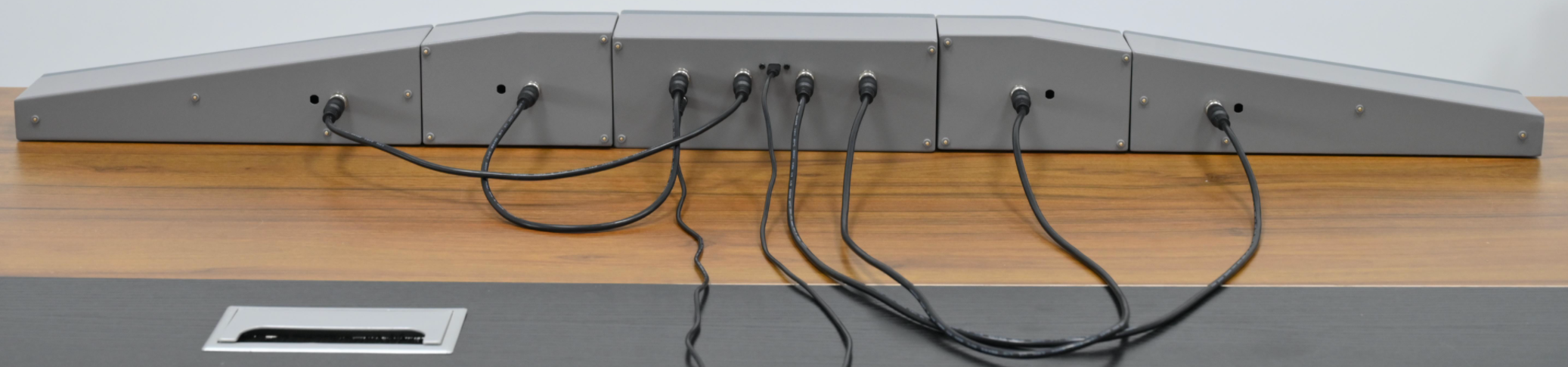
Connections #
The FCU is equipped with one 12V power interface, one USB Type-C interface (for connecting to a computer to transmit button signals and flight data), and four aviation connectors. These aviation connectors are respectively used to connect to the Captain-side EFIS control panel, the Captain-side warning/light panel, the First Officer-side warning/light panel, and the First Officer-side EFIS control panel. Each EFIS control panel and warning/light panel has a corresponding aviation connector for interfacing with the FCU. Both the EFIS control panels and the warning/light panels must be connected to the FCU to operate and cannot function independently.
Install WeSim #
Driver: WeSim(download)


